
BimmerCode for BMW and MINI
SG Software GmbH & Co. KGAuto & Vehicles
4.21.00K Reviews
- Version
- 5.1.1-13473
- Installs
- 1.00M
- Age Rating
- Everyone
Screenshots
Our Review of BimmerCode for BMW and MINI
 Analysis by Appyee
I’ve found that coding a BMW or MINI is most useful when it solves a small, recurring annoyance rather than when it turns into a project to change everything at once. BimmerCode is aimed at owners who want to adjust supported vehicle settings from a phone, but the experience depends on the exact car and a suitable OBD adapter. That makes it worth approaching with a little preparation: identify your vehicle, check what it supports, and decide which change would genuinely make daily driving better.
Start with the car, not the settings menu
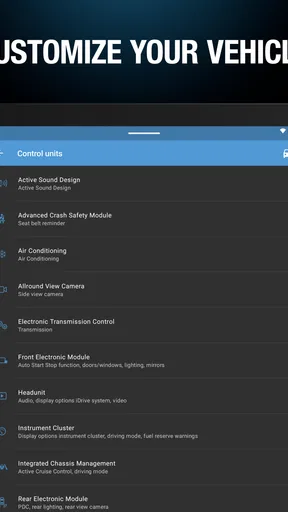
Before buying an adapter or planning a weekend of tweaks, I’d first look up the exact model and year in the compatibility information and see which control units and options are available. BMW and MINI features can vary between generations and equipment levels, so a setting that appears in a guide for one car may not be offered for another. This is the most important practical step, especially if you are considering the app for just one specific feature.
It also helps to make a short list of changes before connecting. Choose one setting, read its description carefully, and avoid treating the menu as an invitation to switch on every option that sounds appealing. Coding is a poor fit for experimentation when you are unsure what a setting affects. A measured approach makes it easier to notice what changed and to return to the previous setup if the result is not what you wanted.
A useful tool for personalising everyday driving
The best use case, in my view, is adapting supported convenience features to your own routine. You might want a different lighting behavior, a display option that is easier to read at a glance, or a start-stop setting that better suits the kind of trips you make. These are modest changes, but they can make a car feel more thoughtfully set up for its owner. Someone who shares a vehicle with family should also consider whether a new setting will make sense to everyone who drives it.
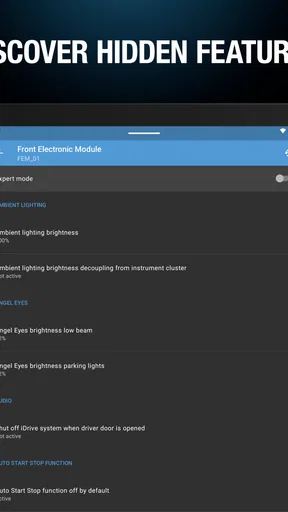
Picture a regular commute with frequent stops: an owner who dislikes the default start-stop behavior may look for a supported adjustment, while another driver may prefer to leave it alone because it suits their route and driving style. The point is not that one choice is universally better; it is that the app can help some owners tailor supported behavior to a real need. I’d make the change while parked, then take an ordinary drive and see whether it actually improves the experience.
Where it sits beside other options
For basic information about a car, an owner’s manual or an ordinary vehicle-settings menu is the simpler route: it explains intended operation without requiring an adapter or coding. A dealership is a better option when you need professional diagnosis, repair, or help with a fault. BimmerCode is for a narrower job—changing supported configuration choices yourself—rather than replacing either source of help.
That distinction matters. A coding app should not be treated as a diagnostic tool just because it connects to the car, and a change to a comfort setting is not a repair. If a warning light or mechanical problem is your reason for looking at vehicle software, I’d seek proper diagnosis instead of trying settings at random. The app is most appealing when the car works normally and you want to personalize an option that the vehicle supports.
As an app in the Auto & Vehicles category, BimmerCode is free to download, though in-app purchases are listed at $49.99 per item. SG Software GmbH & Co. KG develops it. It has a 4.3 average from around 11 thousand ratings, with more than 500 thousand installs. The app is rated for Everyone, and its current version is 4.29.0-12906; Android support starts at version 6.0. Those figures may help set expectations, but they do not guarantee that a particular feature will work with your vehicle.
One practical question is whether you need extra equipment: yes, the workflow described by the app requires an OBD adapter, and compatibility with the car and adapter should be checked before you rely on a planned change. Another is whether every BMW or MINI can use every option: no, available coding choices vary by vehicle. If you are unsure, check compatibility first rather than assuming a feature shown for a different model will appear for yours.
Readability and navigation when the stakes feel high
In my experience, a clear menu matters more here than visual polish. Even a setting with a plain-language label can feel intimidating when it affects a car, so I would read each description slowly and make changes only when the vehicle is parked and the connection is stable. The app’s guided flow can lower the barrier for someone who has never coded a car, but it does not remove the need to understand what an option is meant to do.
If you find dense menus tiring, use a simple routine: handle one category at a time, pause between changes, and keep a note of what you altered and why. That is especially helpful when you share the car or want to compare the new behavior with the factory setup. I would not rush through several unrelated settings just because they are available in the same session.
Motor, sensory, and situational considerations
The phone-based workflow may be convenient for someone who can comfortably read the screen, operate the device, and connect an adapter, but it is not equally easy for every body or situation. Small controls, close visual attention, or holding a phone near the car can be awkward for some users. I’d set up the device before getting into the driver’s seat and avoid interacting with it while driving; coding should be a stationary task, not something to fit into a trip.
There is also a useful distinction between changing a setting and relying on it for a safety-critical need. If a display or reminder is important for your vision, hearing, mobility, or another personal requirement, confirm the car’s behavior directly and do not assume a coding choice is a substitute for an accessible vehicle configuration. When possible, have another person help with the setup and check the result in a safe, parked situation.
Where caution is the better choice
I would skip DIY coding if you are uncomfortable with vehicle settings, cannot confirm that your model supports the change, or are trying to solve a mechanical fault. It is also not the right purchase if you expect a universal list of features across BMW and MINI models, or if you do not want to obtain and manage an adapter. The free download does not mean every desired capability is free; the listed in-app purchase price is $49.99 per item, so check the app’s purchase details before committing to a paid option.
There is a trade-off between convenience and certainty: changing a supported preference yourself can save a trip for a simple configuration request, but it also places more responsibility on you to check compatibility and understand the outcome. For changes you do not recognize, or anything connected to a warning or fault, I would stop and ask a qualified professional rather than guess. A cautious user will get more value from the app than someone who treats coding as harmless trial and error.
Have you ever wished you could unlock the full potential of your BMW or MINI without the fuss of going to a dealership? Well, let me introduce you to BimmerCode, the app that makes it all possible with just a few taps on your smartphone.
Unleashing Your Car’s Hidden Features
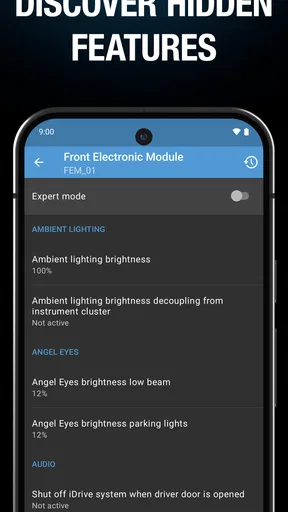
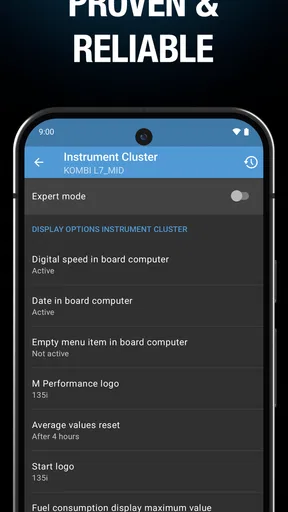
First things first, BimmerCode is a game-changer for anyone who loves their car and wants to customize it beyond the standard factory settings. It’s like having a secret key to your vehicle's hidden features. From adjusting your car’s lighting to enabling digital displays, this app lets you personalize your ride in ways you probably didn’t even know were possible.
Getting started with BimmerCode is surprisingly straightforward. All you need is the app installed on your Android or iOS device and an OBD adapter. Once you’ve connected your phone to your car, the app does all the heavy lifting. No need to be a tech wiz here; the interface is super user-friendly, and the app guides you through each step.
Features That Make You Go "Wow!"
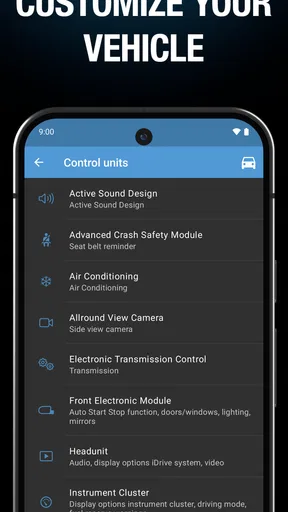
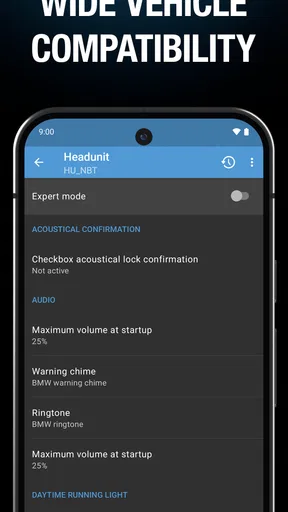
So, what kind of features are we talking about? Well, brace yourself because the list is extensive! You can tweak anything from the auto start-stop function to the dashboard display. Want to disable that annoying seatbelt reminder? Done. Interested in adding some flair with custom welcome lights? Easy peasy. The app even lets you customize your car’s sound system settings for an enhanced audio experience.
One of my favorite features is the ability to enable Apple CarPlay on older models that didn’t originally support it. It’s like giving your car a tech facelift! Plus, the app is regularly updated, so you can expect new features and improvements over time.
Is It Safe and Easy?
Now, I know what you're thinking: "Is this even safe for my car?" Rest assured, BimmerCode is designed with safety in mind. The app only accesses features that are safe to modify, and there’s always a backup option if you want to revert any changes. Plus, there's a dedicated support team ready to help if you run into any hiccups.
Using the app is as simple as pie. Thanks to its intuitive interface, even beginners can navigate through the settings without breaking a sweat. The app categorizes settings into easy-to-understand sections, so you won’t find yourself lost in a sea of technical jargon.
What’s the Catch?
While BimmerCode is powerful, it’s worth noting that not all features are available for every model. The app supports a wide range of BMW and MINI vehicles, but some older models might have limited options. Before diving in, it’s a good idea to check the compatibility list on the app’s website to see what’s available for your particular car.
Another thing to keep in mind is that while the app itself is free to download, unlocking all its features requires a purchase. However, considering the level of customization it offers, many users find it well worth the investment.
The Final Verdict
In a nutshell, BimmerCode is a must-have for any BMW or MINI enthusiast looking to take their car customization to the next level. It’s like having a magic wand for your vehicle, making it as sophisticated or quirky as you like. Whether you’re all about performance or just want to add some personal flair, this app has something for everyone.
So, if you’re ready to unlock a whole new world of possibilities for your car, give BimmerCode a try. Just remember to double-check compatibility and get yourself a reliable OBD adapter. Happy coding!
Verdict
Strengths of BimmerCode for BMW and MINI
- User-friendly interface for easy navigation.
- Supports a wide range of BMW and MINI models.
- Regular updates with new coding options.
- Offline mode available for coding without internet.
- Detailed tutorials and customer support included.
Limitations of BimmerCode for BMW and MINI
- Requires a compatible OBD adapter for use.
- Some features are limited to premium users.
- Potential risk of voiding car warranty.
- Initial setup can be time-consuming.
- Limited functionality for newer car models.
Other Releases by SG Software GmbH & Co. KG
View All
BimmerLink for BMW and MINI
Auto & Vehicles4.2
Similar Picks in This Category
View All
Android Auto
Google LLC4.1

maxim — order a taxi & food
PT. SITO4.7

Штрафы ГИБДД: проверка с фото
Pays LLC – Штрафы ГИБДД4.7

Номерограм – проверка авто
Авто Ассист4.8

Дром Авто
Дром4.9

Frequently Asked Questions
What is BimmerCode, and how does it work?
BimmerCode is an app designed for coding your BMW or MINI's electronic control units (ECUs). It allows you to unlock hidden features and customize your vehicle's settings using a compatible OBD adapter. Simply connect your smartphone to the adapter, launch BimmerCode, and explore various coding options tailored to your car's model.
Is BimmerCode compatible with my BMW or MINI model?
BimmerCode supports a wide range of BMW and MINI models, but compatibility depends on your car's specific year and model. It's essential to check the app's official website or within the app for a detailed list of supported vehicles to ensure your model is included before purchasing an OBD adapter.
What are the common features I can unlock with BimmerCode?
BimmerCode enables you to unlock numerous features like adjusting lighting settings, enabling video in motion, customizing the digital dashboard, and modifying seatbelt reminders. The available options vary based on your vehicle's model and equipment, providing a personalized driving experience tailored to your preferences.
Do I need technical expertise to use BimmerCode?
While BimmerCode is user-friendly, it requires a basic understanding of vehicle coding. The app provides clear instructions and safety guidelines, but it's crucial to follow them carefully. If you're unfamiliar with coding, consider researching or consulting with someone knowledgeable to avoid potential errors or issues.
Is using BimmerCode safe for my vehicle?
BimmerCode is generally safe, but incorrect coding can lead to issues. It's important to follow instructions meticulously and back up your vehicle's original settings before making changes. If you're uncertain, seek guidance from forums or expert users to ensure you code responsibly and minimize risks.
